ЕМИАС.ИНФО
4,7MedisinskOppdatert 7. oktober 2026

Skjermbilder
Fordeler
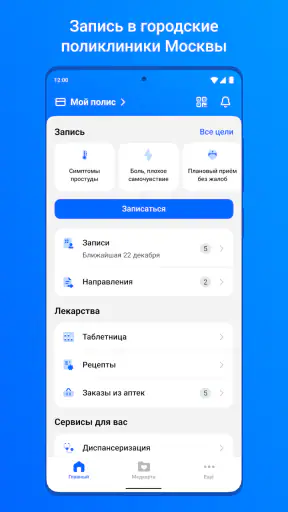
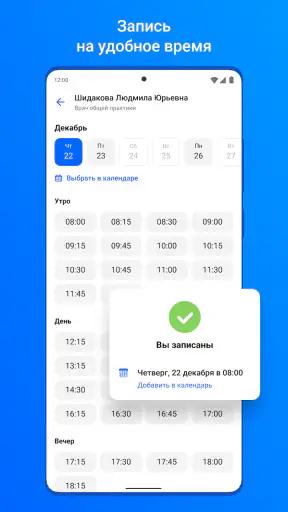
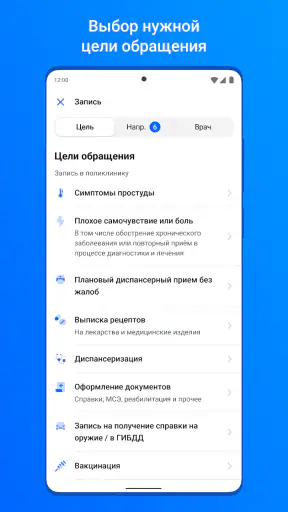
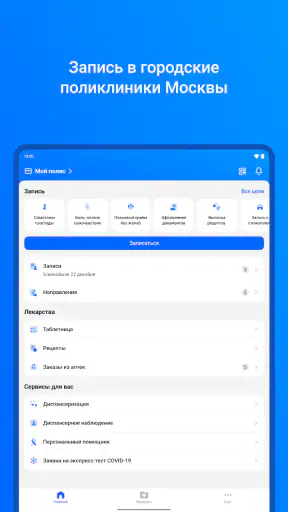
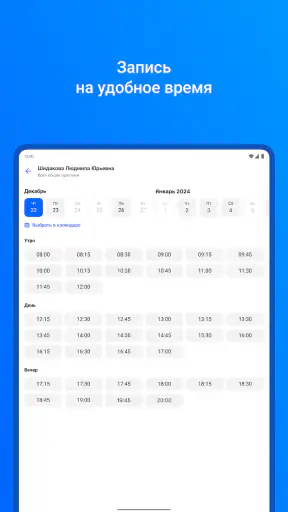
- Bestill legetimer på nett uten å måtte ringe klinikken.
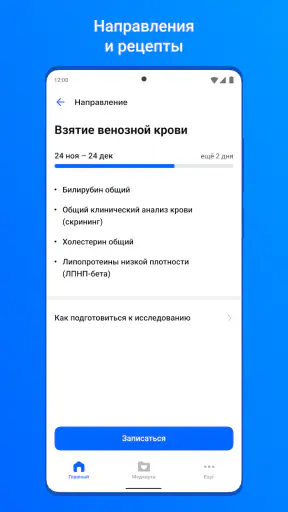
- Se kommende avtaler og informasjon om henvisninger samlet.
- Enkel tilgang til elektroniske resepter og legemiddelinformasjon.
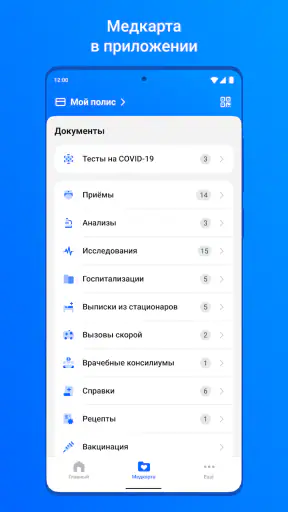
- Lar deg følge med på prøvesvar og opplysninger i journalen.
- Praktisk for pasienter som bruker helsetjenester i Moskva.
Ulemper
- Tjenestene er hovedsakelig rettet mot innbyggere i Moskva.
- Innlogging og bruk kan kreve bekreftelse av personopplysninger.
- Tilgjengelige funksjoner avhenger av klinikken og regionen din.
- Appen er lite nyttig uten stabil internettilkobling.
- Feil eller forsinkelser i synkronisering kan gjøre informasjon utdatert.
 Analyse av Mobexer
For someone who has just moved to Moscow, or is trying to arrange a routine appointment without calling several clinics, ЕМИАС.ИНФО is worth understanding before you need it in a hurry. It is a free medical app focused on appointments at Moscow city clinics. I see its main value as putting a practical first step—finding and arranging a doctor visit—on your phone, rather than making it a substitute for medical advice or every part of a patient’s care.
What to expect from a Moscow clinic app
The service is built around a particular healthcare system: urban clinics in Moscow. That focus is useful if you already receive care there, but it also sets a clear boundary. If you are looking for a general health diary, private clinic booking across Russia, or urgent medical help, this is not the app I would reach for first. Its purpose is narrower: help patients engage with the city clinic system through a mobile device.
That distinction matters for a first-time user. A medical app can sound as though it will answer health questions or coordinate every aspect of treatment. I would approach this one instead as a digital route into routine outpatient care. It may help reduce the small but annoying barriers around arranging a visit, while the consultation itself remains between you and a qualified clinician.
The developer is ГКУ ИАЦ в сфере здравоохранения города Москвы, which makes the app’s Moscow-specific role easier to understand. Its medical category, free price, and PEGI 3 age rating also tell a newcomer what kind of product it is: an administrative healthcare tool intended for broad use, not a game or a paid medical consultation. It was released on 4 September 2015 and has continued to evolve; the current version is 7.61.1.
Its public reach is substantial: ЕМИАС.ИНФО has more than 5 million installs and an average rating of 4.7 from around 99,000 ratings. I treat those numbers as a sign that many people use it, not as a promise that every clinic visit will be effortless. A booking app can only feel smooth when the underlying clinic arrangements and the patient’s account details line up.
Before you install: check whether it fits your situation
The most useful first question is not “Is this the best medical app?” but “Do I receive care at a Moscow city clinic?” If the answer is yes, the app is relevant enough to try. If your doctor works only through a private practice, or you live outside Moscow and use another regional health service, a local booking system or the clinic’s own contact channel is likely to be more useful.
Think about what you want to accomplish on your first visit to the app. A narrow goal—such as seeing whether you can arrange a routine appointment—is more reassuring than expecting to solve all healthcare administration at once. I would not wait until an urgent problem to learn how the app fits into your care. Routine planning gives you time to check your information and choose another route if the digital process does not suit you.
Siste nytt

WEBTOON viser hvordan tegneserier må tilpasses mobilen

SHEIN gjør netthandel til en vane – men tåler hypen møtet med virkeligheten?

Hvorfor Project Makeover Fortryller Spillere med Stil og Strategi

Mob Control: Arkadespillet som Fanger Mobilspillere

My Talking Tom 2 treffer best når omsorgen får svare

Hvordan 4 Pics 1 Word Speiler Vår Digitale Hverdag
Starting carefully and avoiding a rushed setup
After installing, take a moment to confirm that you have the right app for the Moscow city clinic system. The name is easy to recognize, but the important point is the service it represents. The app supports Android from version 6.0 onward, so an older device may not be compatible. On a compatible phone, I would begin when I have a few quiet minutes rather than while standing at a clinic desk.
For healthcare services, identity and patient records are central to whether an appointment workflow makes sense. Use the details you normally rely on when dealing with your clinic, and read each screen before moving on. If the app asks you to choose or confirm information, do not guess just to get through the setup. A mismatch can lead to confusion later, and it is better to pause and check than to create a booking under the wrong patient details.
I would also keep expectations realistic about the first session. Installing an app does not automatically mean that every part of your clinic relationship is ready to use. Give yourself time to understand which information the service recognizes and what action it allows you to take. If a step seems unclear, check the wording and your existing clinic records before repeatedly trying different details.
Make the first useful action small
For a new user, a successful first session does not have to mean completing a complicated medical task. A sensible milestone is reaching the point where you can see how the app relates to arranging care at a Moscow city clinic. If you have a routine concern, use that real need as a guide, but do not treat an available appointment as a clinical recommendation about how soon you need care.
Here is a realistic everyday case: you realize that a recurring, non-urgent issue should be discussed with a doctor, but you have a busy week and do not want to postpone arranging a visit. Instead of waiting until you are already near the clinic, you can use the app as your first digital route into the city clinic process. Keep your goal simple: work out whether the service can help you take the next administrative step, then make a note of any details you need to confirm.
One practical tip is to separate appointment logistics from medical decision-making. If you are unsure whether a symptom can wait, the app’s booking role is not a substitute for appropriate medical guidance. For anything urgent, use the appropriate urgent-care route rather than relying on a routine appointment workflow. That distinction prevents a convenient interface from giving a false sense that an appointment slot is the same thing as triage.
A second useful habit is to check your plan before you leave home. If you have arranged a visit, confirm the clinic and appointment details through the information available to you, and keep any relevant clinic instructions in mind. This is especially helpful when you are booking for someone else or coordinating around work: the app can help with the digital step, but the patient still needs to know where and when to attend.
Where first-time users can get confused
The biggest source of confusion is assuming that every Moscow medical service or every doctor will appear in the same way. ЕМИАС.ИНФО is tied to urban clinics, so the right expectations depend on whether your care is actually connected to that system. If you cannot find the route you expected, first check that you are looking for a city clinic service rather than a private provider or a different regional system.
Another point worth remembering is that a booking tool is not a full medical record in the everyday sense. People often expect one app to contain every result, referral, prescription, and clinic message. I would use ЕМИАС.ИНФО for the task it is designed to support and avoid assuming that the presence of an appointment feature means every other healthcare interaction is handled there too.
When a screen or choice does not make sense, resist the temptation to tap through quickly. In healthcare, a short pause is usually better than creating a mistaken selection. Check whether you are acting for yourself or another patient, review the relevant clinic information, and use a direct clinic contact route if the uncertainty affects where you need to go or who you need to see.
There is also a practical trade-off between convenience and dependence on a phone. A mobile booking route is handy when you have a working device and can use the service comfortably. It is less suitable if you do not want to manage medical arrangements digitally, have a device below the Android 6.0 requirement, or need immediate assistance. In those cases, a clinic’s usual contact method or an appropriate urgent service may be the better choice.
How it compares with calling or using a clinic’s own channel
Compared with calling a clinic, a dedicated city healthcare app can be more convenient for someone who prefers to handle routine arrangements on a phone and check information without making a call. A phone conversation may still be better when your situation is unusual, you need clarification, or you are unsure which clinic route applies. Digital access is useful, but it does not remove the value of speaking to a person when the question is more complex than a straightforward appointment task.
Compared with a private clinic’s own app or website, ЕМИАС.ИНФО has a different purpose rather than a universally broader one. A provider-specific service may be the better choice for someone whose care is entirely private. The Moscow city focus is precisely what makes this app relevant to its intended users, and precisely why it is not a catch-all healthcare organizer for everyone.
I would also distinguish it from general health and symptom apps. Those may help people record habits or read educational material, but they do not necessarily connect users to the same local clinic pathway. ЕМИАС.ИНФО makes more sense when the problem to solve is administrative access to city outpatient care, not when the goal is to interpret symptoms or manage wellness routines.
Who will benefit, and who should use another route
I would recommend trying it if you live in Moscow, use a city clinic, and want a phone-based way to approach routine appointments. It is especially promising for people who already know which clinic they use but find it inconvenient to arrange ordinary visits through traditional channels. The free price also makes it easy to test whether the workflow suits you without committing to a subscription.
I would skip it, or at least not rely on it as the main solution, if you live elsewhere, use only private providers, need emergency care, or prefer to resolve administrative questions directly with clinic staff. It may also be a poor fit if using a smartphone for healthcare is stressful or if your device cannot run it. Choosing a different route in those cases is not a failure; it is simply matching the tool to the care system you actually use.
For a first-time user, my suggested next step is modest: install it on a compatible device, approach setup slowly, and see whether it helps you make progress toward one routine clinic task. Keep your clinic details to hand, verify choices rather than guessing, and have a non-app contact option available if something does not line up. That gives you a useful test without making the app responsible for decisions it is not meant to make.
Overall, ЕМИАС.ИНФО looks most valuable as a practical doorway into Moscow’s city-clinic services. It is not a replacement for a doctor, an urgent-care channel, or every clinic’s own communication method. But if your care belongs to the system it serves, I think it is worth learning before you need an appointment in a rush. The best result is not simply having another app on your phone; it is knowing when this particular route can save you time and when a direct conversation is the wiser choice.
A small routine that makes the app more useful
I would treat the first booking attempt as a chance to learn the path, not just to secure a slot. Once you have worked out whether your clinic details are recognized, take note of the screens and choices that helped you reach the appointment stage. That mental map can save time later, especially when you are trying to arrange a visit between work or family tasks.
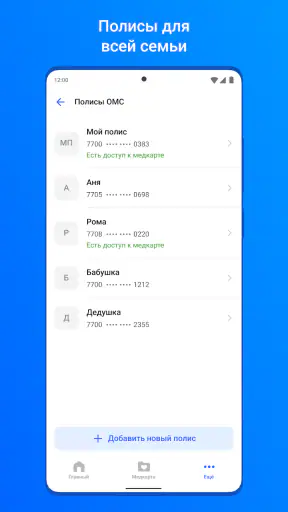
If you help a relative manage appointments, agree in advance who will check the details and pass them on. A convenient phone workflow can still create a practical handoff problem if the patient does not know the time, clinic, or next step. Keeping the appointment information together before closing the app is a simple way to avoid relying on memory.
What I would keep in mind after the first visit
After one successful routine task, I would still keep a backup route in mind. A booking interface is useful for ordinary planning, but a change in symptoms, a confusing clinic instruction, or a record mismatch calls for a more direct conversation. The app is at its best when it removes friction from a clear administrative task; it is less reassuring when the question itself needs explanation.
That is why I see it as a helpful addition for Moscow city-clinic patients rather than a complete healthcare hub. If you know the system you use and want a mobile way to get started with routine care, ЕМИАС.ИНФО is a sensible tool to try. If your care sits elsewhere, or you need personal guidance rather than a booking route, choosing another channel is the more practical decision.
Ofte stilte spørsmål
Hva er ЕМИАС.ИНФО, og hva kan appen brukes til?
ЕМИАС.ИНФО er en app for å bruke enkelte digitale helsetjenester i Moskva. Den er knyttet til byens helsesystem ЕМИАС og kan blant annet gi innbyggere tilgang til opplysninger om legetimer, timebestilling og annen informasjon om helsehjelp. Hvilke funksjoner som vises, kan avhenge av brukerens konto, registrering i systemet og hvilke tjenester som er tilgjengelige i Moskva.
Hvem kan bruke ЕМИАС.ИНФО?
Appen er først og fremst beregnet på personer som mottar helsetjenester gjennom Moskvas kommunale helsesystem. For å bruke personlige funksjoner må du vanligvis ha en relevant registrering og kunne bekrefte identiteten din med opplysningene som systemet krever. Hvis du bor utenfor Moskva eller bruker en annen helsetjeneste, er det ikke sikkert at appen gir tilgang til journalopplysninger eller timebestilling for deg.
Hvordan logger jeg inn, og hvilke opplysninger trenger jeg?
Innlogging krever normalt at du følger appens eller ЕМИАС-systemets identitetskontroll, og at personopplysningene dine samsvarer med registreringen i helsesystemet. Du kan bli bedt om å oppgi eller bekrefte informasjon som knytter kontoen til deg. De nøyaktige trinnene kan endres, så følg instruksjonene i appen. Ikke del passord, engangskoder eller andre innloggingsopplysninger med andre.
Kan jeg bestille eller avbestille legetimer i appen?
ЕМИАС.ИНФО kan gi tilgang til timefunksjoner for brukere som er registrert i det aktuelle Moskva-systemet, men tilgjengelige leger, spesialiteter og tidspunkter varierer. Se etter ledige tider i appen, og kontroller at du har valgt riktig klinikk og tjeneste før du bekrefter. Muligheten til å endre eller avbestille en time kan også avhenge av reglene som gjelder for den aktuelle avtalen.
Er det trygt å bruke appen, og hva bør jeg vite om personvernet?
Appen kan behandle sensitive helse- og identitetsopplysninger, så bruk den bare på en enhet du har kontroll over, og beskytt telefonen med skjermlås. Les personvernerklæringen og informasjonen om databehandling før du logger inn, særlig hvis du vil vite hvilke opplysninger som lagres eller deles. Last ned appen fra en offisiell kilde, hold den oppdatert, og logg ut dersom andre bruker enheten din.